Pages

Sunday, August 16, 2015

This could come in handy.


After uninstalling SMTP server feature on windows 2008 R2 Server, asked for restart, so restarted the Server and after long time ( approx 1 Hour wait) server has not restarted.
Ping was working fine, but RDP was not working.
On the server console below text was getting displayed.
Preparing to configure Windows. Do not turn off your computer.


So done below tricks to make server operational.
  1. Taken remote of another server of which user name and password is same as of SERVER A
  2. Opened services.msc , connected to server A
  3. Come to know WINDOWS MODULES INSTALLER Service is in Stopping mode
    And was not allowing to stop or start from services.msc of Server B
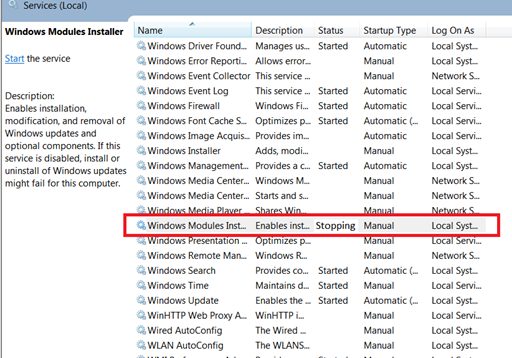

  4. If we hardboot server , there was chance of windows OS crash.
  5. Opened properties of WINDOWS MODULES INSTALLER service to check for the command getting executed for this service
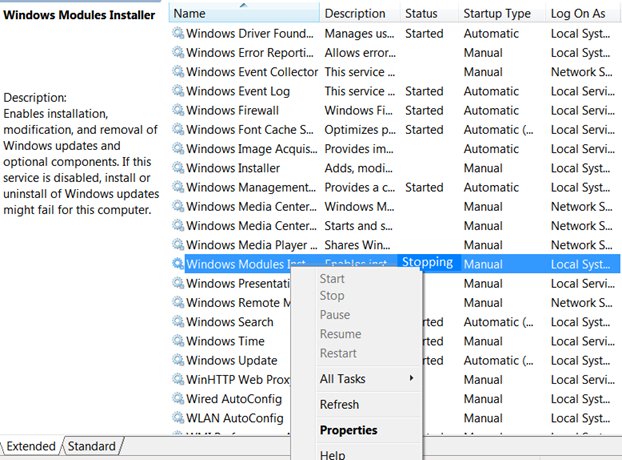
    1. The executable for the service was
      C:\windows\servicing\trustedinstaller.exe
    2. Now searched for remote task manager and downloaded from
      this tool allows to connect to remote system task manager


    3. Right click on the above executable and select option kill
    4. The server was shown below screen


10 ) And restarted the server

Note...this can be done without installing external software as well as follows:

sc \\computername queryex TrustedInstaller

taskkill /s computername /pid /f

or

From another computer used “taskkill /S hostname /IM trustedinstaller.exe”. 

Friday, May 08, 2015

How to change from Evaluation to the real stuff in Windows Server 2012 R2

Yes it is possible to perform with no strange tools at all. Before you start you need to have your product key (either a MAK or a KMS client key)

Step-by-Step

  • Start an elevated command or powershell prompt.
  • Execute “slmgr /dlv” to get information on the current status.
image
  • Execute “dism /online /get-currentedition” to get the current edition, it should be an Evaledition
image
image
  • Restart the server (it will reboot twice)
  • Done

Saturday, May 02, 2015

VIPRE Agent "Not Communicating" after 1 - 5 days


VIPRE admin console will start reporting agents with a status of "Not Communicating" after 1 - 5 days.  Restarting the computer will change the status from "Not Communicating" to "Protected" but the issue will come back anywhere from 1 - 5 days after the restart.  This is a known issue, and there are 2 ways to fix this:

1. Use the Private Release

Issue is fixed in a private release (VIPRE Agent 7.0.5746)

To apply the patch do the following.

1. Open the VIPRE Business Console
2. Open Site Properties and select "Updates"
3. Uncheck "Automatically download Agent Software Updates"
4. Apply the change, select OK, and close the Console
5. Stop the VIPRE Business Premium Site Service
6. Download the Private Release below:

Note To find out if you are running standard or premium, go to the list of agents, right-click on the affected machine and choose Agent Details.  Near the upper left, you will see the Agent Type.

7. Save & Replace the file(s) in the Volatile Data's SoftwareUpdate folder:
  • C:\ProgramData\VIPRE Business\SoftwareUpdate (Default)
8. Start the VIPRE Business Site Service

Once finished, deploy the Private Release agent to affected machines. 


2. Workaround: can be applied to 7.0.5711 and 7.05725 agent if upgrading is not desired.
  • Set AP to "Execution Only" (Confirm End-Users don't control AP) 
  • Ensure all Email Clients are Unchecked inside Email Protection 
  • Ensure Email Client Ports are both set to "0" 
  • Close all instances of Outlook and unregister VIPRE's "SBAMOutlook.dll" file 

Note: All users must have outlook closed to unregister "SBAMOutlook.dll"  If possible perform these steps when no one is logged into the machine.

Unregistering VIPRE's SBAMOutlook.dll:
  1. If possible: Log-out all other users 
  2. Close Outlook, if it's open 
  3. Open an Administrative Command Prompt 
  4. Change Directory to the Agent's Installation Folder 
  5. Run the following command: regsvr32 /u 'C:\Program files (x86)\VIPRE Business Agent\SBAMOutlook.dll" 


Note: There should be a dialog confirming success

Thursday, April 09, 2015

VOIP Dial Plans

Universal:
x.T|*xx
Default without having to dial 9 for a four digit extension:
[0-8]xxxT3|911|411|611|011xxx.T3|1xxxxxxxxxx|[2-9]xxxxxxxxx|*xxx.T3
The default but with the ability to test providers by dial 55 then phone number:
[0-8]xxxT3|55xxx.T|911|411|611|011xxx.T3|1xxxxxxxxxx|[2-9]xxxxxxxxx|*xxx.T3

Sources
http://apetec.com/voip/Polycom-DialPlan.htm
http://blog.voipdiy.com/2012/10/what-is-dial-plan.html
https://wiki.asterisk.org/wiki/display/DIGIUM/Dial+Plans
http://wiki.voip.ms/article/Dial_Plan_for_Linksys_ATAs
http://voipstuff.net.au/dial-plans/


Friday, March 27, 2015

VMware blogs

http://www.vladan.fr

http://www.virten.net

HP Customized ESXi Image and HP Server Support Matrix


As of 3/27/2015

  • ESXi and vSphere:
    • vSphere 6.0 March 12, 2015 - Download here
    • vSphere 5.5 U2 Nov 2014 - Download here
    • vSphere 5.5 U1 Dec 2014 - Download here
    • vSphere 5.5 June 2014 - Download here
    • vSphere 5.1 U3 Dec 2014 - Download here
    • vSphere 5.1 U2 Nov 2014 - Download here
    • vSphere 5.1 U1 Sept 2013 - Download here
    • vSphere 5.1 Feb 2013 - Download here
    • ESXi 5.0 U3 Nov 2014 - Download here
    • ESXi 5.0 U2 Sept 2013 - Download here
    • ESXi 5.0 U1 Oct 2012 - Download here
    • ESXi 4.x - Download here
    • Contents of above images available here
HP Server Support Matix for VMware
http://h17007.www1.hp.com/us/en/enterprise/servers/supportmatrix/vmware.aspx


Source
http://www8.hp.com/us/en/products/servers/solutions.html?compURI=1499005#tab=TAB4


Tuesday, March 24, 2015

Moving Firefox profile to new computer


  1. Completely close firefox on your old computer
  2. Copy the profile folder on old computer (C:\Windows\Profiles\\Application Data\Mozilla)  to the location where you want to new computer C:\Windows\Profiles\\Application Data\Mozilla.
  3. Start the Profile Manager by typing the following in Start firefox.exe -P
  4. Click on the "Create Profile..." button.
  5. In the dialog that opens, enter a descriptive name for the profile.
  6. Click on the "Choose Folder..." button. A "Browse for Folder" dialog will open.
  7. Select the profile folder you copied and click OK.
  8. Review the path shown in the "Completing the Create Profile Wizard" dialog to make sure it is correct, then click "Finish" to create the new profile.
  9. Select the new profile and press the Start button to start Firefox using the moved profile.

Image:Profilemanager1.png

Source
http://kb.mozillazine.org/Moving_your_profile_folder

Monday, March 16, 2015

Excel or Outlook takes a long time opening file

1. Click Start then click Computer.
2. Click Organize.
3. Select Layout, and then click to clear Preview pane.
4. Open the Excel workbook and test.

If the error continues to occur, go to the next method.

Windows Explorer:
1. Right click on Start button
2. Click Open Windows Explorer
3. Click Organize | Layout
4. Uncheck Details Pane and Preview Pane

Excel:
1. Click File | Open
2. Click Organize | Layout
3. Uncheck Details Pane and Preview Pane

Outlook:
1. Open a new e-mail
2. In the "Include" group on the Ribbon, click Attach File
3. Click Organize | Layout
4. Uncheck Details Pane and Preview Pane

Source
https://support.microsoft.com/en-us/kb/2779852
http://geniustechbar.blogspot.com/2013/03/excel-cannot-complete-this-task-with.html

Wednesday, February 18, 2015

CodeTwo Active Directory Photos

A nice free tool for importing photos into Active Directory.  The tool can be run from any computer which were the user is logged int an account with administrative rights.

CodeTwo Active Directory Photos
http://www.codetwo.com/freeware/active-directory-photos/


Tuesday, February 17, 2015

How to Unprotect an excel sheet without password

In Excel on the Developer Tabs press View Code

Copy and paste the following.  When Done press F5 to Run code.  The sheet is unprotected now.

Sub PasswordBreaker()
    'Breaks worksheet password protection.
    Dim i As Integer, j As Integer, k As Integer
    Dim l As Integer, m As Integer, n As Integer
    Dim i1 As Integer, i2 As Integer, i3 As Integer
    Dim i4 As Integer, i5 As Integer, i6 As Integer
    On Error Resume Next
    For i = 65 To 66: For j = 65 To 66: For k = 65 To 66
    For l = 65 To 66: For m = 65 To 66: For i1 = 65 To 66
    For i2 = 65 To 66: For i3 = 65 To 66: For i4 = 65 To 66
    For i5 = 65 To 66: For i6 = 65 To 66: For n = 32 To 126
    ActiveSheet.Unprotect Chr(i) & Chr(j) & Chr(k) & _
        Chr(l) & Chr(m) & Chr(i1) & Chr(i2) & Chr(i3) & _
        Chr(i4) & Chr(i5) & Chr(i6) & Chr(n)
    If ActiveSheet.ProtectContents = False Then
        MsgBox "One usable password is " & Chr(i) & Chr(j) & _
            Chr(k) & Chr(l) & Chr(m) & Chr(i1) & Chr(i2) & _
            Chr(i3) & Chr(i4) & Chr(i5) & Chr(i6) & Chr(n)
         Exit Sub
    End If
    Next: Next: Next: Next: Next: Next
    Next: Next: Next: Next: Next: Next
End Sub

Sorce
http://uknowit.uwgb.edu/page.php?id=28850